FREE SKILLS MATRIX TEMPLATE + GUIDE
Download an editable Excel skills matrix and step-by-step guide for organizing your skills framework, defining role requirements, documenting proficiency, and identifying capability gaps.

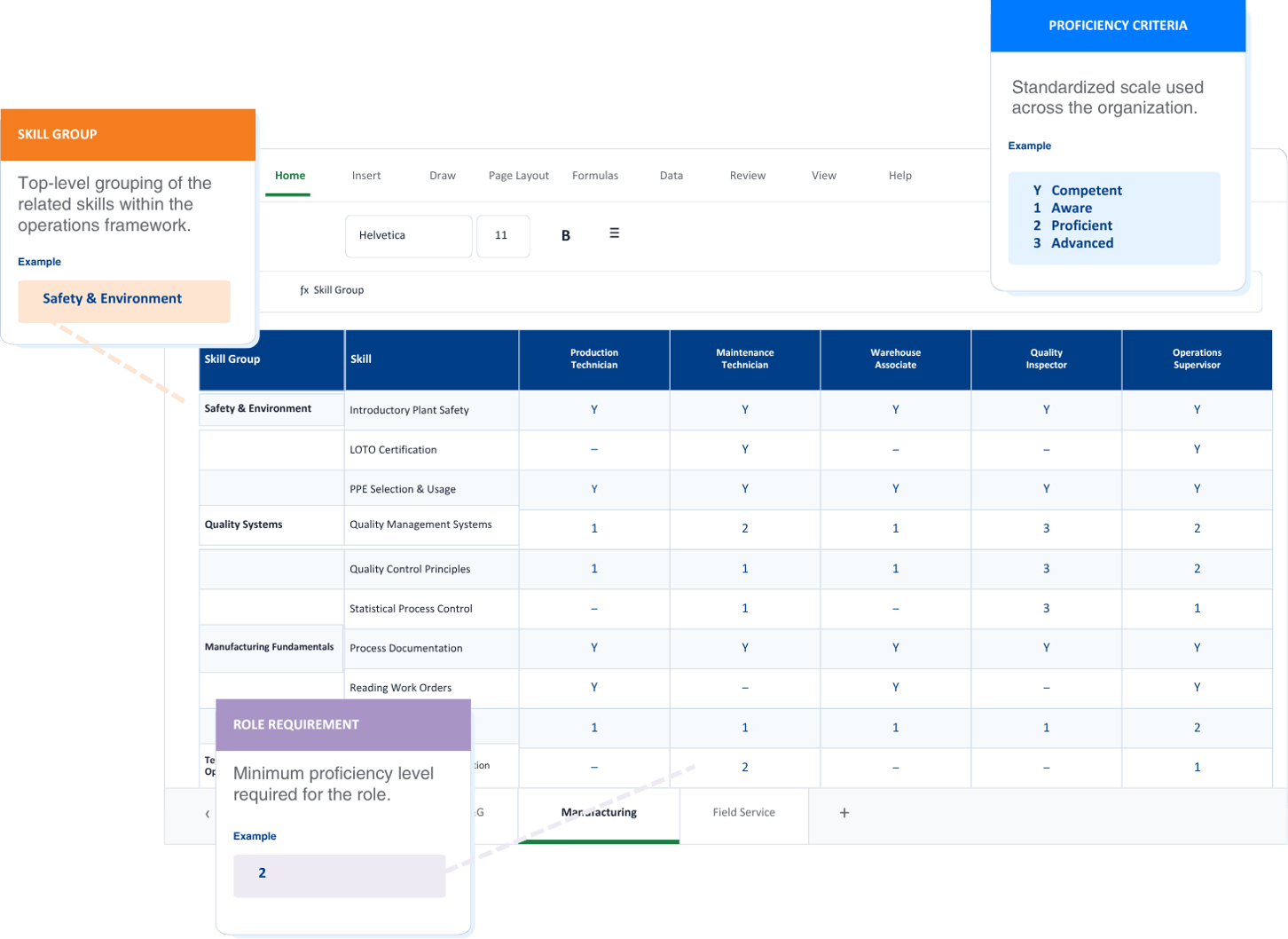
Generic skills inventories often focus on broad abilities or self-reported experience. A skill matrix built for frontline organizations needs greater specificity. Roles may require technical competencies, safety training, licenses, certifications, and documented proficiency in critical tasks.
Kahuna’s Skills Matrix Template and Guide help you organize these requirements by role and establish consistent proficiency levels. With a clearer framework, teams can identify capability gaps, prioritize assessments and development, and improve access to the records needed for staffing and audit or survey preparation.
Choose the example roles, skill groups, and proficiency requirements most relevant to your organization, then adapt them to your teams, locations, and operating environment.
Example Roles: Machine Operator, Assembly Technician, Welder, CNC Machinist, Quality Inspector, Maintenance Engineer, Shift Supervisor
Example Skill Groups: Safety and Environment (Lockout/Tagout (LOTO) Training & Authorization, PPE Selection & Usage, Hazardous Materials Handling) and Quality Systems (QMS, ISO 9001, Statistical Process Control)
Example Roles: Field Technician, Well Site Supervisor, Control Room Operator, Process Engineer, Maintenance Engineer, HSE Advisor, Operations Manager
Example Skill Groups: HSE & Permitting (Permit to Work, LOTO/Energy Isolation, H2S Safety & Gas Detection, Confined Space Entry) and Process Safety (PHA/HAZOP, Management of Change, LOPA)
Example Roles: Field Tech I, Field Tech II, Senior Field Tech, Field Service Engineer, Field Supervisor
Example Skill Groups: Safety & Compliance (Site Safety Orientation, Driving/Vehicle Safety, JSA/Risk Assessment, DOT Regulatory Compliance) and Technical Fundamentals (Electrical, Mechanical, Hydraulics & Pneumatics)
Example Roles: ICU Nurse, ER Nurse, Clinical Pharmacist, Charge Nurse, Nurse Manager, Clinical Educator
Example Skill Groups: Safety & Compliance (HIPAA Privacy & Security Training, Infection Control & PPE, Workplace Violence Prevention), Clinical Certifications & Competencies (BLS, ACLS, IV Therapy), and Survey Readiness (Joint Commission and other regulatory survey preparation)
Download the editable workbook and guide to customize roles, skill groups, proficiency requirements, and assessment criteria for your organization.
A useful skills matrix begins with a clear framework for organizing the skills, competencies, certifications, and other requirements that support the work. The accompanying guide walks you through structuring that skills taxonomy around your organization, prioritizing the most important operational needs, and creating greater consistency across teams and locations.
Organize skills around your business units, functions, departments, roles, and operational processes so every requirement has a logical place within the larger framework.
Focus initial development efforts on the skills most closely connected to priorities such as safety, quality, throughput, staffing coverage, retention, and knowledge transfer.
Work with subject-matter experts to document the knowledge, experience, behaviors, training, certifications, and performance criteria required to perform critical work.
Establish consistent definitions, proficiency levels, ownership, and assessment criteria while accounting for requirements that may need to remain specific to a site, team, or process.
An Excel skills matrix can provide a useful starting point for a team, department, or pilot program. Dedicated skills matrix software becomes more practical when skills and competency data must remain current across a larger workforce and support ongoing operational decisions.
Separate spreadsheets make it difficult to maintain consistent role requirements, proficiency definitions, and employee records across departments, facilities, and regions.
Centralized reporting gives leaders a more current view across the organization, while integrations connect skills data with HR, learning, scheduling, and other systems.
Software helps teams keep records current as employees complete assessments, develop new skills, change roles, or take on additional responsibilities.
Automated workflows and notifications reduce the manual work required to monitor renewals, expiration dates, and changes in employee qualification status.
Frontline workforce organizations that need ongoing assessments, automated workflows, expiration management, and real-time visibility may be ready to move from an Excel skills matrix to a digital skills matrix with skills and competency management software.
Skills matrix software is a digital tool for managing role requirements, employee proficiency, certifications, qualifications, and workforce skills gaps. It replaces disconnected spreadsheets with a centralized system where authorized users can complete assessments, update records, analyze capability, and view skills data across employees, teams, roles, and locations.
Depending on the platform, skills matrix software or skills management software may also support assessment workflows, certification expiration management, reporting, integrations, mobile access, and targeted development planning.
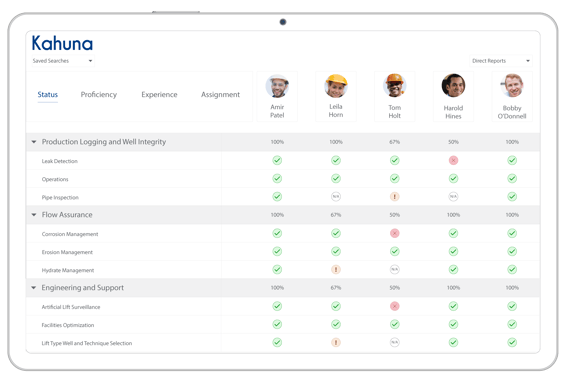
A skill matrix maps specific skills and proficiency levels against employees or roles. A competency matrix may cover broader combinations of skills, knowledge, behaviors, and performance criteria. A training matrix records required and completed training.
Organizations sometimes use “skills matrix” and “competency matrix” interchangeably. However, a training record confirms that someone completed training, while a skills or competency assessment documents whether they have demonstrated the proficiency required for the work.
Download the editable Skills Matrix Template and step-by-step guide to begin defining role requirements, documenting proficiency, and identifying capability gaps within your frontline workforce.